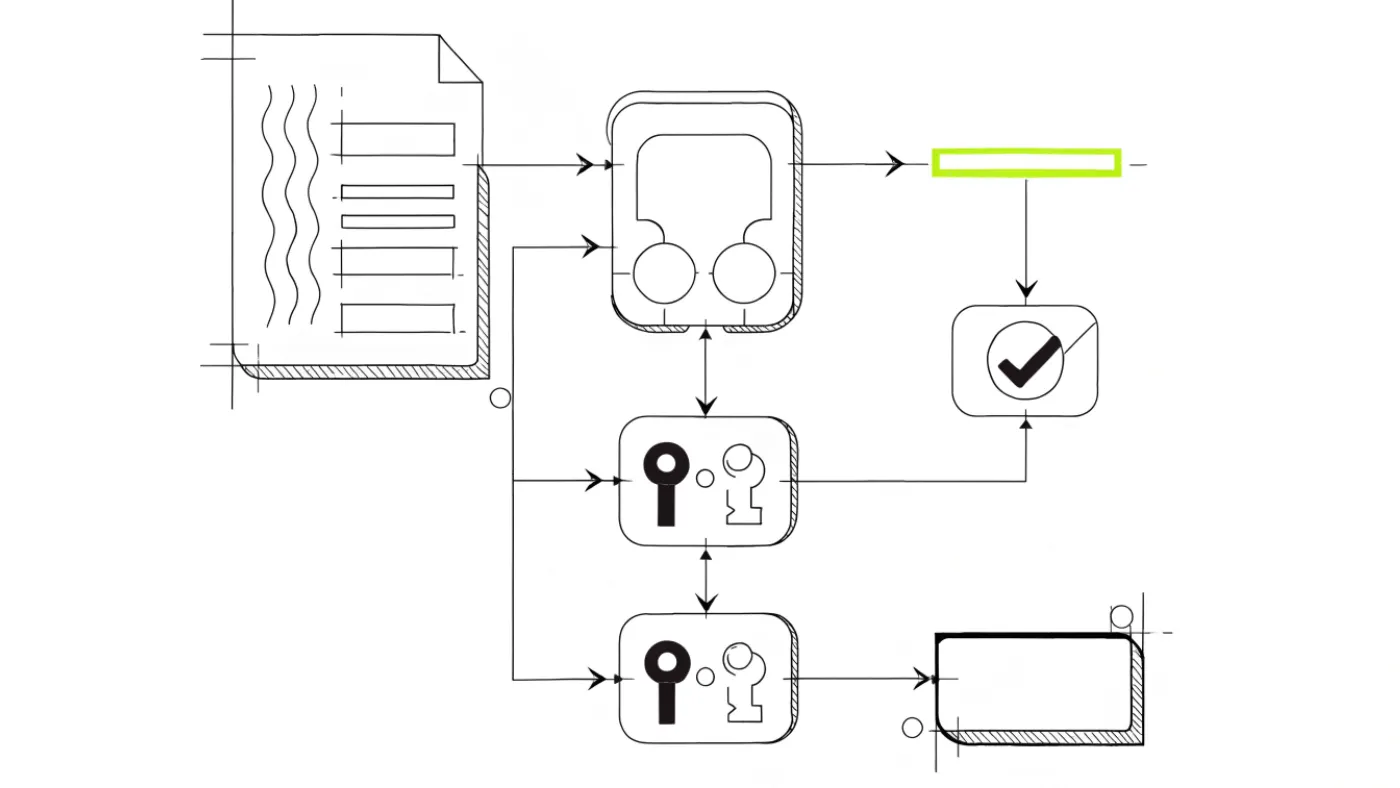
PGP signature verification involves checking the integrity and authenticity of a signed document. Use the gpgv tool for a straightforward verification process, returning 0 for a valid signature and 1 for an invalid one. Key steps include:
- Ensure the public key belongs to the sender.
- Use the
--verifyoption with GnuPG. - Confirm the signature is well-formed and intact.
Understanding PGP Signatures
PGP signatures are a vital component of secure communication. They ensure message integrity and authenticity by allowing the recipient to verify that a message has not been altered and that it originates from the claimed sender. A PGP signature is created using a private key and can be verified with the corresponding public key.
The role of public and private keys is crucial in this process. The private key is kept secret by the sender and is used to generate a unique signature for each message. The public key, on the other hand, is shared with recipients. It allows anyone to confirm the signature's validity without revealing the private key. This asymmetric encryption model ensures that even if the public key is widely distributed, the private key remains secure, maintaining the integrity of the signature[1].
When verifying a PGP signature, it is essential to ensure that the public key belongs to the sender[1]. This step prevents impersonation and ensures that the message genuinely comes from the intended source. Tools such as GnuPG, Kleopatra, and online verification services like OpenPGP.js can facilitate this verification process[2].
PGP signatures must be well-formed and cryptographically correct. They should contain the necessary metadata and avoid including unknown critical subpackets[3]. A valid signature requires both the signature and the signed data to be intact and unaltered[4].
As of 2023, concerns have been raised about the reliability of PGP signatures. For instance, only 36% of uploaded signatures on the Python Package Index (PyPI) were meaningfully verifiable[5]. Additionally, by 2023, 49% of PGP keys used for signing on PyPI had expired, highlighting the need for users to manage their keys actively[6].
For secure communication, it is advisable to use a trusted version of GnuPG for integrity checks[7]. This practice helps mitigate potential security risks associated with using unverified software. Understanding PGP signatures and their verification is essential for anyone engaged in secure communications, especially in environments like the darknet, where scams and fraud are prevalent.
How PGP Signature Verification Works
PGP signature verification employs a series of cryptographic techniques to ensure message integrity and authenticity. The process primarily involves hashing, encryption, and the use of public and private keys.
Hashing Process
- Hash Creation: When a document is signed, a hash of the document is created using a hashing algorithm, such as SHA-256. This hash uniquely represents the content of the document.
- Signature Generation: The hash is then encrypted using the sender's private key, creating the digital signature. This signature is attached to the original document.
Verification Steps
To verify a PGP signature, follow these steps:
- Obtain the Sender's Public Key: Ensure the public key used for verification genuinely belongs to the sender. This step is crucial for preventing impersonation[1].
- Hash the Received Document: Generate a hash of the received document using the same hashing algorithm.
- Decrypt the Signature: Use the sender's public key to decrypt the attached signature. This process reveals the original hash created during signing.
- Compare Hashes: Compare the decrypted hash with the newly generated hash. If they match, the signature is valid, indicating the document has not been altered and originates from the claimed sender.
Tools for Verification
Common tools for PGP signature verification include:
- GnuPG: Use the
--verifyoption to check signatures against signed documents[8]. - gpgv: A simplified tool for signature verification that returns 0 for a good signature and 1 for a bad one[9].
- Kleopatra: A user-friendly interface for managing PGP keys and signatures.
Important Considerations
For effective verification:
- Ensure that the signature and the signed data are intact and unaltered[4].
- PGP signatures must be well-formed and contain necessary metadata, avoiding unknown critical subpackets[3].
- Regularly manage and update public keys to avoid issues, as reports indicated that 49% of PGP keys on the Python Package Index had expired by 2023[6].
Understanding and implementing these steps can significantly enhance security, especially in environments prone to scams and fraud, such as the darknet.
Step-by-Step Guide to Verifying PGP Signatures
Verifying PGP signatures ensures the authenticity and integrity of messages. Follow these steps to verify signatures using popular tools like GnuPG and online verifiers.
Using GnuPG
Install GnuPG: Ensure you have GnuPG installed. Download the latest trusted version to avoid security risks[7].
Obtain the Public Key: Acquire the sender's public key. Confirm that it genuinely belongs to the sender to prevent impersonation[1].
Verify the Signature:
- Open your command line interface.
- Use the following command:
gpg --verify signature_file.asc signed_file.txt - Replace
signature_file.ascwith the file containing the signature andsigned_file.txtwith the document.
Check the Output: GnuPG will return a message indicating if the signature is valid or not. A good signature confirms the document's integrity and authenticity.
Using gpgv
gpgv is a simpler tool for verification, returning 0 for a valid signature and 1 for an invalid one[9].
- Run gpgv:
gpgv signature_file.asc signed_file.txt - Interpret the Results: If you receive a return value of 0, the signature is valid.
Using Kleopatra
Kleopatra offers a graphical interface for managing keys and signatures.
Open Kleopatra: Load the application and import the public key if not already done.
Verify Signature:
- Right-click on the signed document.
- Select "Verify Signature" from the context menu.
Review Verification Results: The interface will display the verification status, indicating whether the signature is valid.
Online Verification Tools
For quick checks, online tools like OpenPGP.js can be used. However, ensure to trust the service provider.
Upload the Files: Go to the online verifier and upload both the signature and the signed document.
Check Results: The tool will indicate if the signature is valid.
Important Considerations
- Always ensure that the signature and signed data remain intact and unaltered[4].
- PGP signatures must be well-formed, containing necessary metadata[3].
- Regularly manage and update public keys, as outdated keys can lead to verification failures[6].
By following these steps, users can effectively verify PGP signatures, enhancing security in communications, particularly in environments susceptible to scams.
Common Tools for PGP Verification
Several tools facilitate PGP signature verification, each with distinct features. Below are some popular options:
GnuPG
GnuPG (GNU Privacy Guard) is the most widely used tool for PGP verification. It supports a range of cryptographic standards and provides robust functionality.
Pros:
- Comprehensive tool for managing keys and signatures.
- Supports command-line operations and scripting.
- Allows users to manage their web of trust by assigning trust levels to keys[10].
Cons:
- Requires familiarity with command-line interfaces.
- Initial setup can be complex for beginners.
gpgv
gpgv is a simpler version of GnuPG focused solely on signature verification. It checks signatures without the complexity of the full GnuPG tool.
Pros:
- Easy to use, returning 0 for valid signatures and 1 for invalid ones[9].
- Minimal setup required.
Cons:
- Lacks advanced features for key management and trust settings.
- Not suitable for those needing comprehensive cryptographic capabilities.
Kleopatra
Kleopatra is a graphical user interface (GUI) for managing PGP keys and signatures, making it more accessible for users unfamiliar with command-line tools.
Pros:
- User-friendly interface simplifies key management and signature verification.
- Integrates well with GnuPG for backend operations.
Cons:
- May be less efficient for experienced users who prefer command-line tools.
- Some advanced features may be hidden behind menus.
Online Verification Tools
Online verification tools, such as OpenPGP.js, provide a quick way to verify signatures without installing software.
Pros:
- Convenient for quick checks and easy to use.
- No installation required.
Cons:
- Security risks associated with uploading sensitive documents online.
- Reliability depends on the trustworthiness of the service provider.
Important Considerations
When selecting a tool for PGP verification, consider the following:
- Ensure the public key used for verification genuinely belongs to the sender[1].
- Verify that the signature and the signed data are intact and unaltered[4].
- Regularly manage and update public keys to avoid verification failures, as many keys may expire[6].
Choosing the right tool depends on the user's needs and level of expertise. For comprehensive management, GnuPG is preferred, while gpgv and Kleopatra offer simpler alternatives. Online tools provide convenience but come with security trade-offs.
Verifying PGP Signatures Online
Using online PGP verification tools offers convenience and speed. However, there are significant risks associated with this method. Online tools can expose sensitive data, as uploading files to third-party services may compromise security. Users must ensure that the service provider is trustworthy to avoid potential scams or data breaches.
Advantages of Online Verification Tools
- Accessibility: No installation required; users can verify signatures from any device with internet access.
- Speed: Quick verification process compared to setting up local tools.
- User-Friendly: Many online tools feature intuitive interfaces, making them suitable for beginners.
Risks of Online Verification Tools
- Data Exposure: Uploading sensitive documents to an online service can lead to unauthorized access.
- Service Trustworthiness: Not all services are reliable; using untrustworthy tools could result in false verification outcomes.
- Limited Functionality: Some online tools may not support advanced features available in desktop applications.
Reputable Online PGP Verification Services
- OpenPGP.js: A widely used library that enables PGP operations in the browser, allowing users to verify signatures without compromising security.
- PGP Global: An online tool that supports PGP signature verification with a focus on user privacy.
- Keybase: While primarily a secure messaging platform, Keybase offers PGP signature verification alongside key management features.
Important Considerations
When using online verification tools, consider the following:
- Always verify the legitimacy of the service provider before uploading any sensitive documents.
- Ensure the public key used for verification genuinely belongs to the sender to avoid impersonation risks[1].
- Be aware that online verification tools may not always provide the same level of security as local applications like GnuPG or Kleopatra.
In summary, while online PGP verification tools can provide convenience, users must weigh the benefits against the potential risks to ensure their data remains secure.
Troubleshooting PGP Signature Verification Issues
Verifying PGP signatures can sometimes result in errors. Understanding common issues and their solutions can help users successfully verify signatures.
Common Errors
Expired Keys: Reports indicate that 49% of PGP keys used for signing on PyPI were expired in 2023[6]. This can lead to verification failures.
Incorrect Public Key: If the public key used does not belong to the sender, verification will fail[1]. This is a frequent mistake that can occur during manual key management.
Malformed Signatures: PGP signatures must be well-formed and contain necessary metadata. Issues arise if they include unknown critical subpackets[3].
Altered Documents: If the signed document has been modified, the hash comparison will fail, leading to an invalid signature message[4].
Solutions and Tips
Check Key Expiry: Regularly verify the validity of public keys. Use tools like GnuPG to check key status and update them as needed.
Verify Key Ownership: Always confirm that the public key matches the sender's identity. This can minimise impersonation risks. Use a trusted key server or direct communication to verify the key.
Inspect Signature Format: Ensure that signatures are correctly formatted. Use tools like GnuPG or
gpgvto identify any formatting issues during verification.Maintain Document Integrity: Before verifying a signature, ensure that the signed document has not been altered. Use checksums or hashes to verify the document's integrity.
Use Reliable Tools: Employ trusted tools for verification. The GnuPG suite is recommended for its comprehensive features, while
gpgvis suitable for straightforward signature checks[9].
Additional Considerations
When troubleshooting, keep in mind that using a trusted version of GnuPG is crucial for integrity checks. Avoid newly downloaded versions to mitigate potential security risks[7]. Regularly managing and updating public keys can prevent many verification issues, particularly in environments susceptible to scams and fraud, like the darknet.
Best Practices for PGP Key Management
Effective management of PGP keys is crucial for maintaining security and ensuring the integrity of communications. Here are best practices for key generation, storage, and revocation.
Key Generation
- Use Strong Algorithms: Generate keys using strong algorithms like RSA (at least 2048 bits) or ECC (Elliptic Curve Cryptography). This enhances security against brute-force attacks.
- Utilise Trusted Software: Use well-regarded tools like GnuPG for key generation. Avoid using unknown or unverified software to prevent potential vulnerabilities[7].
Key Storage
- Secure Storage Solutions: Store private keys in encrypted formats. Consider using hardware security modules (HSMs) or password-protected USB drives for added security.
- Backup Keys: Regularly backup keys in secure locations. Use encrypted backups to prevent unauthorised access.
- Limit Access: Ensure that access to private keys is restricted. Use strong passwords and enable two-factor authentication (2FA) where possible.
Key Revocation
- Revocation Certificates: Create revocation certificates when generating keys. This allows you to revoke keys if they are compromised or no longer in use.
- Regular Audits: Periodically review and revoke old or unused keys. In 2023, it was reported that 49% of PGP keys on PyPI had expired[6]. Regular audits can prevent reliance on outdated keys.
Security Measures
- Protect Private Keys: The security of a digital signature depends heavily on the protection of the private key[1]. Always keep private keys offline when not in use.
- Public Key Verification: Before using a public key for verification, ensure it genuinely belongs to the intended sender. This prevents impersonation risks[1].
- Stay Updated: Update key management practices regularly. Follow best practices to adapt to evolving security threats, particularly in environments prone to scams, such as the darknet.
Following these best practices will help ensure the integrity and security of PGP communications. Proper key management is essential to safeguard against potential threats and maintain trust in digital signatures.
Legal Considerations and Risks in PGP Usage
Using PGP in the context of darknet markets involves significant legal implications and risks. While PGP can enhance communication security, it does not provide immunity from law enforcement scrutiny. Users must be aware of these factors to navigate the legal landscape effectively.
Legal Implications
Data Privacy Laws: Many jurisdictions have laws governing data protection and privacy. Using PGP may be viewed as a method to protect sensitive information. However, it can also attract legal attention if associated with illicit activities. For example, in jurisdictions with stringent anti-drug laws, transactions on darknet markets can lead to criminal charges.
Encryption Regulations: Some countries impose restrictions on the use of encryption technologies. Users must ensure compliance with local laws regarding encryption to avoid potential legal consequences. In some regions, failing to comply can result in fines or imprisonment.
Evidence in Court: PGP signatures can be used as evidence in legal proceedings. However, the validity of such evidence depends on proper signature verification and key management. If a PGP key is compromised or mismanaged, it may undermine the integrity of the evidence presented in court.
Risks of Using PGP
Impersonation and Fraud: The risk of impersonation is significant in darknet markets. Users must verify that the public key used for signature verification genuinely belongs to the sender to prevent scams[1]. Failure to do so can result in financial loss or exposure to illegal activities.
Exit Scams: Darknet markets are notorious for exit scams, where operators disappear with users' funds. PGP can help verify the authenticity of transactions, but it cannot guarantee protection against scams. Users should remain vigilant and adopt additional safeguards, such as escrow services, to mitigate these risks[9].
Law Enforcement Takedowns: Law enforcement agencies actively monitor darknet activities. The use of PGP does not shield users from being tracked or apprehended. In many cases, operational security measures must be complemented by an understanding of the legal environment.
Best Practices
To navigate the legal landscape effectively, users should:
- Regularly update and manage public keys to ensure their validity and security[6].
- Familiarise themselves with local laws regarding encryption and data protection.
- Use reliable tools for signature verification to mitigate risks of impersonation and fraud[2].
- Employ escrow services for transactions to provide an additional layer of security against exit scams.
Understanding the legal considerations and risks associated with PGP usage in darknet markets is essential. Users must remain informed and cautious to protect themselves from potential legal repercussions and scams.
Frequently Asked Questions about PGP Verification
What is PGP verification?
PGP verification is the process of confirming the authenticity of a message or document signed with a PGP (Pretty Good Privacy) signature. It ensures that the message was created by the claimed sender and has not been altered.
How do I verify a PGP signature?
To verify a signature with GnuPG, use the --verify option. This checks the signature against the signed document and indicates if the signature is valid[8]. For simpler checks, the gpgv tool can be used, returning 0 for a good signature and 1 for a bad one[9].
Why is the public key important in PGP verification?
The public key is essential because it confirms the identity of the sender. If the public key used for verification does not belong to the sender, the signature cannot be trusted[1]. Always ensure that the public key is legitimate before verifying a signature.
What are common issues that can affect PGP verification?
Expired Keys: A significant number of PGP keys may expire over time. In 2023, 49% of keys used for signing on PyPI were found to be expired[6].
Malformed Signatures: PGP signatures must be well-formed and contain the necessary metadata. If they include unknown critical subpackets, verification may fail[3].
Altered Documents: If the signed document is modified after signing, the hash comparison will fail, resulting in an invalid signature[4].
Are there tools for PGP verification?
Yes, several tools are available for PGP verification:
- GnuPG: A widely used tool for managing keys and verifying signatures.
- Kleopatra: A graphical front-end for GnuPG that facilitates key management and signature verification.
- Online verification services: Such as OpenPGP.js, which allow users to verify signatures from a web browser[2].
Why was PGP support removed from PyPI?
As of 2023, PyPI removed support for PGP signatures because only 36% of uploaded signatures were meaningfully verifiable[5]. This highlights the importance of maintaining valid and correctly formatted signatures.
What can I do to ensure successful PGP verification?
- Regularly Update Keys: Check the validity of public keys and update them as necessary.
- Verify Key Ownership: Always confirm that the public key matches the sender's identity.
- Use Trusted Tools: Employ reliable software like GnuPG for verification tasks[7].
Understanding these aspects of PGP verification can enhance security and help prevent fraud, particularly in sensitive environments like darknet markets.
Common Mistakes and Misconceptions
Overlooking Key Expiry
Many users neglect to check the validity of public keys. In 2023, 49% of PGP keys on PyPI were expired[6]. This oversight can lead to failed verifications and potential security risks. Regularly verify and update keys to ensure they are current and effective.
Misunderstanding Signature Format Requirements
Some users assume that any signature can be verified without checking its format. PGP signatures must be well-formed and free from unknown critical subpackets to be valid[3]. Failing to inspect the format can result in verification failures. Always ensure signatures meet the necessary criteria before attempting verification.
Relying on Untrusted Tools
Users might use unverified or newly downloaded versions of GnuPG for verification. This poses security risks, as untrusted tools can compromise key integrity[7]. It is advisable to use a trusted version of GnuPG and regularly update it to maintain security during verification processes.
Ignoring Document Integrity
Some individuals forget to confirm that the signed document has not been altered before verification. If changes occur post-signing, the verification will fail[4]. Always check the document's integrity using checksums or hashes before verifying signatures.
Assuming PGP Provides Complete Anonymity
There is a common misconception that PGP guarantees complete anonymity in communications. While it enhances security, PGP does not shield users from law enforcement scrutiny or tracking[1]. Users must adopt additional operational security measures and understand the legal implications of their actions in the darknet context.
Conclusions
- Regularly verify and update public keys to ensure they are valid.
- Use trusted tools like GnuPG for key management and signature verification.
- Create revocation certificates to manage compromised keys effectively.
- Always confirm the authenticity of public keys before verification to prevent impersonation.
- Stay informed about legal implications and risks associated with PGP usage, especially in darknet environments.
Next steps include reviewing the best tools for PGP verification to enhance security: Comparing PGP Verification Tools: Which is Best?.
Common questions
What are PGP signatures?
PGP signatures are cryptographic signatures created using a user's private key. They confirm the authenticity and integrity of a message or document, ensuring it has not been altered since signing.
How to verify a PGP signature Kleopatra?
To verify a PGP signature in Kleopatra, import the public key of the sender. Then, right-click on the signed file and select 'Verify'. The software will indicate whether the signature is valid.
How to validate a GPG signature?
To validate a GPG signature, use the --verify option with GnuPG. This checks the signature against the signed document and confirms its validity[8]. Alternatively, use the gpgv tool for a simpler verification process[9].
Is PGP still used today?
Yes, PGP is still used today, although its adoption has declined in some areas. As of 2023, the Python Package Index removed support for PGP signatures due to low verification rates[5]. However, it remains relevant in secure communications.
What tools can I use for PGP signature verification?
Common tools for PGP signature verification include GnuPG, Kleopatra, and online services like OpenPGP.js[2]. These tools facilitate key management and signature validation.
How do I troubleshoot PGP signature verification issues?
To troubleshoot PGP signature verification issues, check for expired keys, malformed signatures, and ensure the signed document has not been altered[4]. Regularly updating public keys can also help prevent verification failures.
What are the risks of using online PGP verification tools?
Using online PGP verification tools poses risks such as exposure to phishing attacks and potential interception of sensitive data. It is advisable to use trusted, offline tools like GnuPG for enhanced security.
Bibliography
- Understanding Digital Signatures
- PGP Signature Verification - Jimmy Song
- 9. Signature verification — OpenPGP for application developers
- 6. OpenPGP Signatures — OpenPGP for application developers
- blog.pypi.org
- PGP signatures on PyPI: worse than useless - ENOSUCHBLOG
- GnuPG - Integrity Check
- Making and verifying signatures
- gpgv (Using the GNU Privacy Guard)
- Chapter 4. Daily use of GnuPG
Explore More on Secure Communication
Discover additional resources to enhance your privacy knowledge.
View More Articles